

Docs / Write and organise
Search and commands
Press Ctrl + K to search all your pages or run any command without leaving the keyboard. Type tasks in plain words, such as "Call the bank tomorrow 4pm", and Worlds understands the date and time, in English and in Arabic.
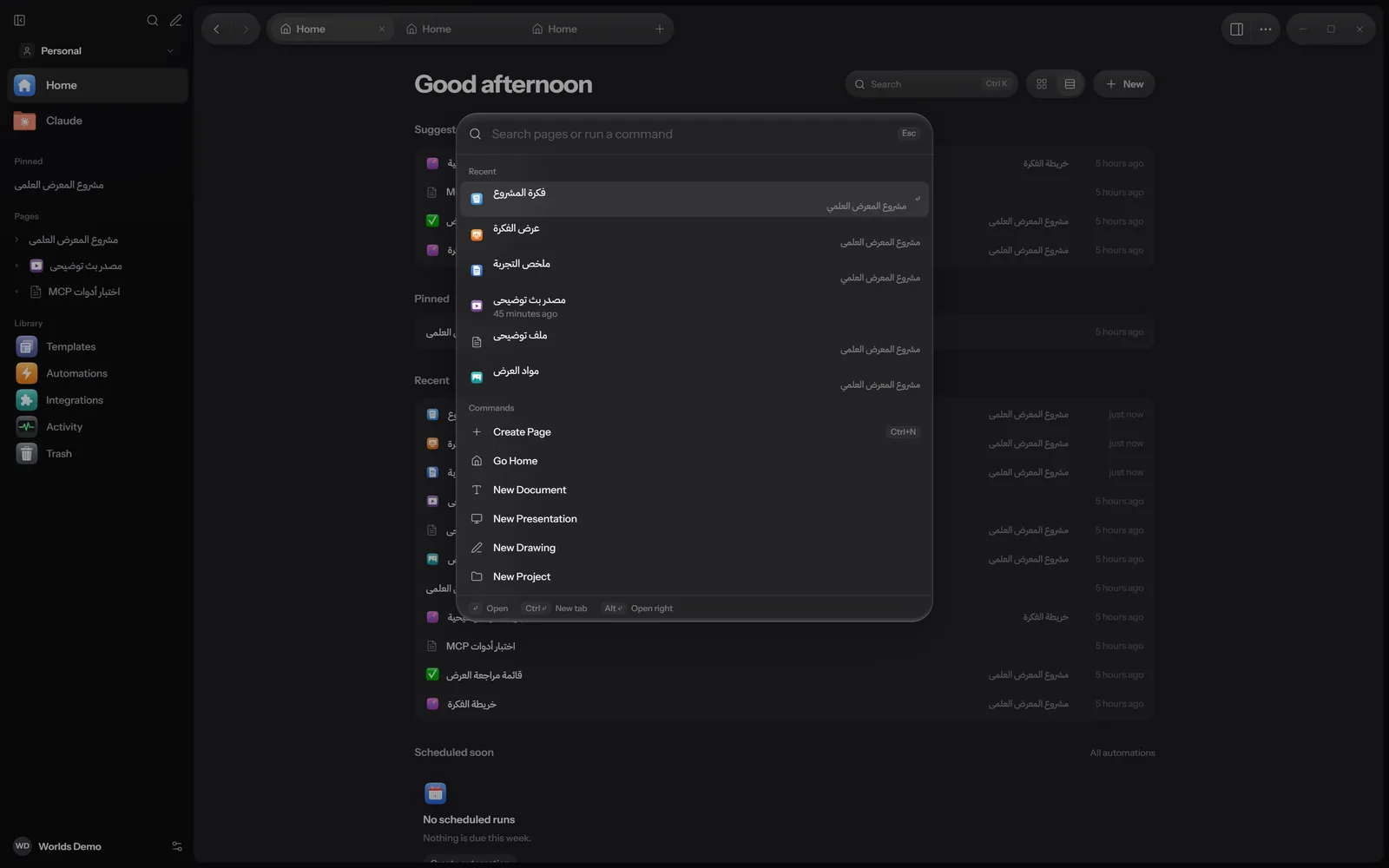
The command palette
| Keys | Opens |
|---|---|
| Ctrl + K | Pages and commands together. Press it again to close. |
| Ctrl + P | Pages only: Go to a page. |
| Ctrl + Shift + P | Commands only: Run a command. |
You can also open it with the Search button in the sidebar or on Home, or by right-clicking an empty spot and choosing Search and Commands. If you select text and right-click, Search Worlds searches for it.
Inside the palette
- Before you type: Recent (the last 6 resources you opened), then commands.
- Type to search, and use the Up and Down arrows to move.
- Enter: Open. Ctrl + Enter: New tab. Alt + Enter: Open right. Esc: close.
- If nothing matches, you are offered Create a page with the name you typed.
Commands
Commands also match some Arabic words, such as «مهام», «تقويم», «رسم» and «جدول».
| Command | Shortcut |
|---|---|
| Create Page | Ctrl + N |
| Go Home | |
| Tasks, New Task | |
| Calendar, New Event | |
| Inbox | |
| Quick Capture | Ctrl + Alt + N |
| New Document, New Spreadsheet, New Presentation, New Drawing, New Project, New Gallery | |
| Upload Files, Add Stream Link | |
| Templates | |
| Automations, Create Automation | |
| Ask Claude | Ctrl + J |
| Claude Conversations | |
| Split Right | Ctrl + \ |
| Split Left, Back to One Pane | |
| Toggle Sidebar | Ctrl + Shift + L |
| Integrations, Activity, Profile | |
| Settings | Ctrl + , |
| Settings: Appearance, Settings: Packs | |
| Trash |
When a page is open you also get New Subpage, Pin Page or Unpin Page, Insert Image, Insert File, Send to Discord, Assistant Instructions, Page History, Duplicate Page, Save Page as Template, and Archive Page or Unarchive Page. With the Study pack: Study and New Subject.
Search
Search in the palette looks in:
- Page titles and the text of every block.
- The names of attached files, not their contents.
- Text in drawings and drawing library tags.
- Other fields: project descriptions, document headers and footers, task notes, event locations, subject teachers and rooms, assignment instructions, and spreadsheet sheet names and cell values.
Search finds a word even inside a longer word, which suits Arabic. With several words, you get results that contain all of them, and title matches come first. Pages in Trash do not show; archived pages do. Templates show too: picking one creates a new page from it.
Find in a page
Ctrl + F opens Find in page, and Ctrl + H adds Replace with. The Aa button matches case, then Replace or All. Enter goes to the next match, Shift + Enter to the previous one, and Esc closes.
Quick capture and quick add
Quick capture
Ctrl + Alt + N from anywhere in Worlds opens Quick capture. Type anything and press Enter (or Save); Shift + Enter adds a new line.
- Normally the text is saved as is to the Inbox, to sort out later.
- With Save as a task ticked, the date, time and priority are read from the text and a task is created.
In the Inbox, each item has Task, Event and Page buttons to turn it into one of those; Task and Event read the date from the text.
Quick add fields
These fields understand dates and times and show what they understood before you save: in Tasks, in Calendar (a one-hour event if you give a time, otherwise all day), Add a task for today on Home, project tasks, goals, and a subject's assignments, exams and things to bring.
What it understands
| You type | It reads |
|---|---|
today, tod, اليوم | Today |
tonight, الليلة | Today, at 8 pm if you give no time |
tomorrow, tmr, tmrw, بكرة, بكره, غدا, غدًا | Tomorrow |
after tomorrow, بعد بكرة, بعد غد | In two days |
next week, الأسبوع الجاي, الأسبوع القادم | In 7 days |
in 3 days, in 2 weeks, بعد 3 أيام, بعد 2 أسابيع | After that long. Write the number in digits |
Weekdays: sunday or sun to saturday, on mon, next mon, and Arabic الأحد to السبت (with or without «ال», optionally after «يوم») | The next day with that name, never today |
2026-12-05 | That date |
5/12 | Day first, then month: 5 December. If it has passed, next year |
4pm, 5:30, 5:30pm, 17:00, at 9:30, الساعة 5 مساء, 9 صباحا | The time. "at 5" on its own means 05:00 |
!, !!, !!!, or !1, !2, !3 | Priority |
The words it understands are removed from the title. A time with no date means today, or tomorrow if that time has passed. It does not understand month names, "next month" or tags yet.
Examples
If today is Wednesday 11 November 2026 at 10 am:
| You type | Title | When | Priority |
|---|---|---|---|
| Call the bank tomorrow 4pm !! | Call the bank | 12 November, 16:00 | 2 |
| Standup at 9:30 | Standup | 12 November, 09:30 (9:30 has passed today) | |
| Renew passport in 3 days !1 | Renew passport | 14 November | 1 |
| Invoice 5/12 | Invoice | 5 December | |
| اجتماع الفريق الخميس الساعة 5 مساء | اجتماع الفريق | 12 November, 17:00 | |
| أراجع العرض بكرة | أراجع العرض | 12 November |
A weekday name in the title is always read as a date. "Read Monday Morning", for example, becomes "Read Morning" due on Monday. If that is not what you meant, fix the title or the date after saving.
Keyboard shortcuts
On Windows use Ctrl. Inside any page, Ctrl + / shows a short list.
Everywhere
| Keys | What it does |
|---|---|
| Ctrl + K | Search and commands |
| Ctrl + P | Go to a page |
| Ctrl + Shift + P | Run a command |
| Ctrl + Alt + N | Quick capture |
| Ctrl + N | New page |
| Ctrl + Shift + N | New page in a pane on the right |
| Ctrl + T | New tab |
| Ctrl + W | Close tab |
| Ctrl + Tab, Ctrl + Shift + Tab | Next and previous tab |
| Ctrl + \ | Split right |
| Ctrl + Shift + \ | Back to one pane |
| Alt + Left or Right arrow | Back and forward |
| Ctrl + Shift + L | Show or hide the sidebar |
| Ctrl + J | Ask Claude |
| Ctrl + , | Settings |
| Ctrl + click, Alt + click | Open in a new tab, open on the right |
In a page
| Keys | What it does |
|---|---|
| / | Block menu |
| @ or [[ | Mention a page |
| Ctrl + B, I, U | Bold, italic, underline |
| Ctrl + Shift + S | Strikethrough |
| Ctrl + E | Inline code |
| Ctrl + Shift + H | Highlight |
| Ctrl + Shift + 7, 8, 9 | Numbered list, bulleted list, checklist |
| Ctrl + Z | Undo |
| Ctrl + Shift + Z or Ctrl + Y | Redo |
| Ctrl + S | Save now |
| Ctrl + F, Ctrl + H | Find, replace |
| Ctrl + Shift + F | Focus mode |
| Ctrl + Alt + L | Lock the page, or allow edits again |
| Ctrl + / | Keyboard shortcuts |
In the sidebar
Arrows to move, expand and collapse, Enter to open, and F2 to rename.
Drawings, spreadsheets and presentations have their own shortcuts: Drawing, Spreadsheets, Presentations.
What works where
| Feature | Windows | Apple | Android |
|---|---|---|---|
| Search | Yes | Partly | Partly, with find and replace in a page |
| Command palette | Yes | In progress | In progress |
| Reading dates in Arabic and English | Yes | In progress | Yes |
| Quick capture from anywhere | Yes | In progress | In progress |
On the Mac some menu shortcuts work, such as Cmd + N, Cmd + F and Cmd + ,. The Apple and Android apps are still in progress. Details in Install.